Introduction to Databases
Objectives
- Understand why we use databases?
- Understand what Tables, Rows, & Columns represent.
- Know what primary keys and foreign keys are.
- Know the difference between database relationship types.
- Practice drawing Entity Relationship Diagrams (ERD).
Introduction
- Why databases?
- But... why databases?
- Understand what Tables, Rows, & Columns represent
- What is a primary key?
- Understand how tables relate to each other using foreign keys
- Know the difference between relationship types
- Draw Entity Relationship Diagrams (ERD)
- Bringing it together
- ERD Lab
Why databases?
- Why indeed.
- We tried to store data in files.
- However, text files are unique to an operating system.
- If Lichard in development made changes to the text file...
- ...Kathew in accounting would need to manually update his.
- Entire jobs were dedicated to keeping files updated!
- Network sharing helped a little bit here but there was still one problem...
- If someone edited the file, someone else's changes could be lost!
But... why databases?
- They are structured!
- Data is stored into neat, organized containers that make logical sense.
- Data can be accessed via a dedicated query language
- They have their own protocol, too.
- Databases can even be standardized and normalized.
Databases are Tables of Objects
- We use databases to store our objects as tables.
- These objects have attributes; in very special cases there can be abilities as well.
- Databases are great for keeping things neat and organized.
Tables, Rows, & Columns
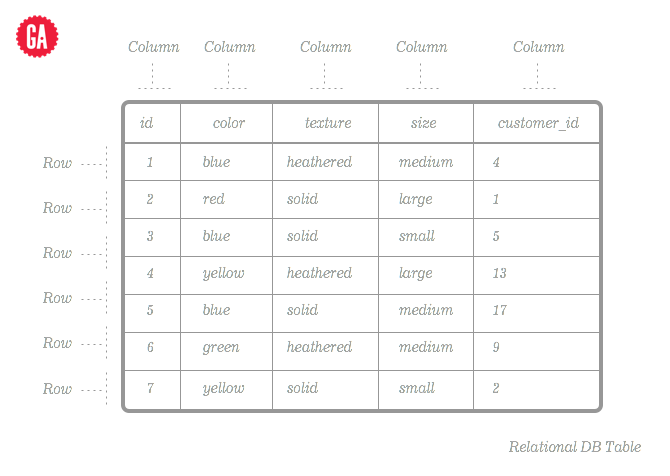
- Tables represent a list of objects as data.
- Rows represent one unique item* from this list.
- Columns represent the attributes of the object being listed.
Now, I'm going to demonstrate on the whiteboard what tables, rows, and columns represent.
What is a primary key?
- A primary key is a unique identifier.
- Each table will contain one column that is unique.
- This means that no two values in this column can ever be the same.
- These are usually the object's id.
- They typically auto increment.
- So
Lichard.idis 1,Kathew.idis 2, and so forth.
Official Documentation: https://www.sqlite.org/lang_createtable.html#rowid
Foreign keys connect databases
- We can also specify foreign keys on columns.
- These are used to link two tables together.
- Humans sometimes have cats, right?
- So the human's
cat_idwould a foreign key to the cat'sid!
I'm going to draw this out on the board to demonstrate it.
Official Documentation: https://www.sqlite.org/foreignkeys.html
Let's talk relationships
- No, not your Facebook status.
- We've talked about so far about linking things together.
- Let's think about ownership or... sharing.
- People can have one thing... such as a home, or a car.
- People can also have many things... such as pets, friends, or books.
- Things can be owned by people as well, right?
- Let's remove the word 'owned' and now call think of it as a relationship.
Sound familiar?
- Foreign keys are used to connect the dots here.
- They link different objects together by relationship.
- In SQL, there are a few proper ways to show relationships.
- Let's check them out
Relationship Statuses
"Oh we just split up... he preferred JSON over me..."
- One to One
- One to Many
- Many to Many
Can you think of some examples for each type?
ERD - Entity Reference Diagram
- Let's think of our tables of objects as entities
- When planning out a new website or system, we need to think about it.
- Who starts building a skyscraper without an architectural layout?
- We need to plan out our databases.
- We use ERDs to do this.
Problem: Before we can make diagrams, we need to know what type of data each column is.
Data Types
SQLite supports a few basic data types. They are:
NULL. The value is a NULL value.TEXTis a blob of text; stored using the database encoding (UTF-8, UTF-16BE or UTF-16LE).INTEGER. The value is a signed integer, stored in 1, 2, 3, 4, 6, or 8 bytes depending on the magnitude of the value.REAL. The value is a floating point value, stored as an 8-byte IEEE floating point number.BLOBis a blob of data, stored exactly as it was input.
Source: http://www.sqlite.org/datatype3.html
Where are the other types? If you're familiar with SQL, SQLite indirectly supports boolean, timestamps, and more. Read the documentation for more information: https://www.sqlite.org/datatype3.html
Bringing it Together
- So we have tools to organize our data.
- Let's think about how useful this can be.
- Can you already think of how certain apps store their data?
- Can you think about how you'll store your own data?
ERD Lab
Lab time! Let's break up into groups of four. We're going to discuss and build ERDs for popular website.
Wait to be prompted to build your ERDs.
Each group will be chosen to present one website on their board towards the end of this lab.